Release 3.3
ServicePlaza Release Notes published: October 2025.
Intro
This release note is intended to assist our customers' service personnel with the installation, operation and maintenance of the product discussed here.
Disclaimer
All texts and illustrations have been prepared with the utmost care, but any errors cannot be ruled out. Damovo's liability, regardless of the legal grounds, for damages or consequential damages that may arise from the use of the information given in this document is excluded.
Copyright
The document is protected by copyright. The disclosure and publication of this document is not permitted without the express written permission of Damovo. Violations oblige the customer to pay damages. All rights reserved in the event of patent grant or CTM registration.
The software and hardware designations used in this document are in most cases also registered trademarks and as such are subject to the statutory provisions.
Please read the "Release Notes" carefully, as they contain important information and additions for you. The statements in the "Release Notes" take precedence over the manuals.
Before you start installing or using it, be sure to read the information in the current version of the release notes.
Requirements
Resources
No change in resource requirements.
Browser Support
The following browsers are supported with the microservice versions used:
Browsers:
- Google Chrome
- Microsoft Edge
- Mozilla Firefox
- Apple Safari
For all browsers, only the desktop version (Windows / MAC) is supported, the mobile versions of the browsers have not been tested.
Explanation of version support:
The web frameworks used by ServicePlaza each support the latest version provided by the browser manufacturer. Furthermore, the respective previous version is supported.
Example:
Google Chrome in version 87 is the current version. In this case, version 87 and version 86 are supported.
Changes
New Features
Catalog – Orders without Location Selection & Location Details
In many cases within ServicePlaza, location selection and location details are not required. Previously, there was no option to hide these fields, meaning the location selection was always displayed by default.
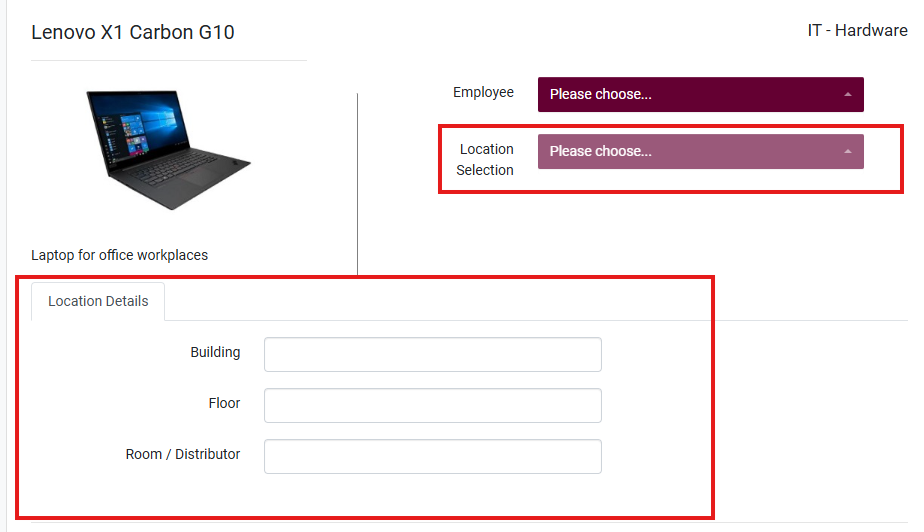
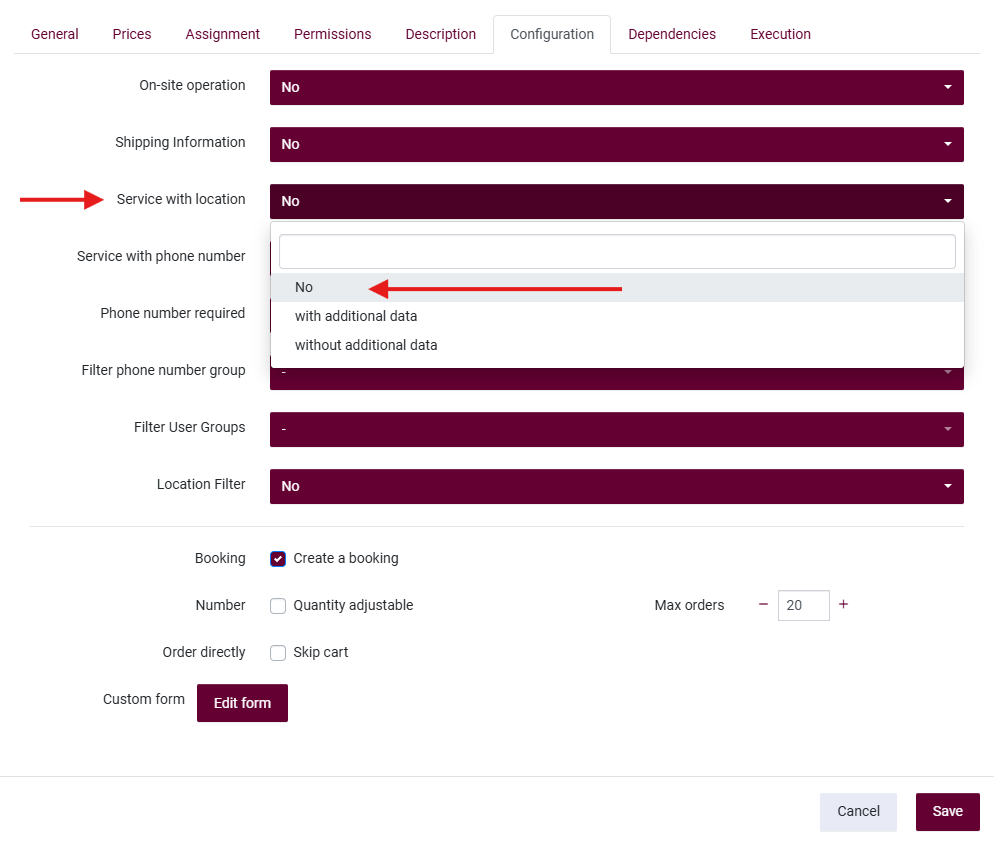
This behavior can now be adjusted: In the ServicePlaza settings for Services/Changes, you can now select No for the Service/Change with Location option under the Configuration tab.
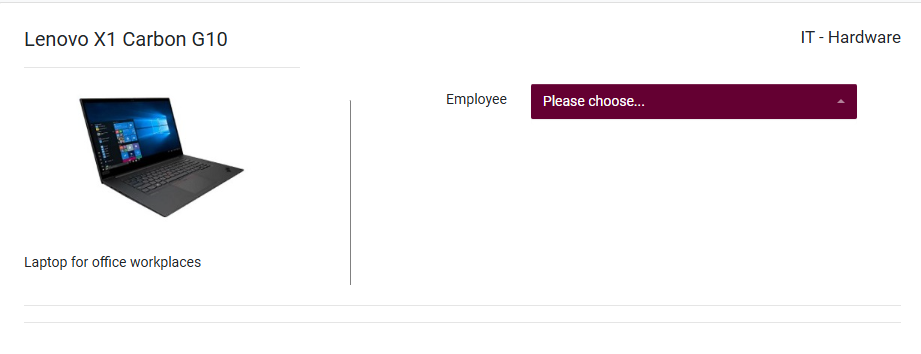
Once this setting is applied, the location details and location selection will no longer be displayed during the order process for the respective Service or Change.
Change – on Asset (Direct) – Product Pre-filter non-functional
When configuring a Change, you can define the desired Change Type. For the “on Asset” type, there is an advanced configuration option: the Product Filter. This allows you to specifically define which exact assets the Change should be applicable to.
Previously, there was an issue with the “on Asset (direct)” Change Type. The Product Filter option was not functioning. This led to limitations, as the filter could not be utilized in this specific scenario, even when it was required.
This issue has now been resolved. The Product Filter can now be used fully and without restrictions for the “on Asset (direct)” Change Type as well.
OmniTracker – Automatic Asset Assignment via Solution Description
Asset assignment can now be triggered automatically through the OmniTracker integration. The user enters the asset identifier in the "Solution Description" field of the OmniTracker ticket using the following syntax:
Single asset:
Identifier:abcdefgh
Multiple assets — each identifier on a separate line in the desired order:
Identifier:abcdefgh
Identifier:abcdefgi
Identifier:abcdefgj
ServicePlaza reads the field content, extracts the identifier based on the defined format, and performs the asset assignment automatically.
Note: The asset must already exist in ServicePlaza and be assigned to the correct product. If the asset does not exist, the order is automatically reopened in OmniTracker (default behavior of the OmniTracker–ServicePlaza integration).
Service Incompatibility – Self-Reference & Error Message Improvements
To prevent a service from being ordered more than once by the same user, it can now be added to its own incompatibility configuration. When the service is already active, an error is displayed during the ordering process.
The following issues with this behavior have been resolved:
- False positive errors: Previously, configuring a service as its own incompatibility always triggered an error — even when no active instance existed. This has been corrected.
- Error message persistence: The error message now remains visible until explicitly dismissed by the user, instead of disappearing automatically.
- Error message formatting: Raw HTML elements that were previously displayed in the error message are no longer visible. The message is now rendered correctly.
Form.io – Custom File Upload Component
ServicePlaza uses Form.io for building forms without a paid subscription. As part of this release, a custom file upload component has been developed and integrated into the Form.io element library.
This component was not available in the open-source version of Form.io and previously had to be built manually for each use case. It is now available as a reusable element and can be added to any form directly via the Form.io editor.
Orders – Enhanced Visibility in Approval Tab
The Approval tab under Orders / My Tasks now provides an extended view of approval-related order activity.
Previously, only open approvals assigned to the current user were visible. With this release, the following improvements have been made:
-
Historical approvals: Orders that have already been approved or rejected are now visible in the Approval tab, in addition to open ones.
-
Group approval transparency: When multiple users share an approval group (e.g. two approvers in the same role), each member can now see approvals carried out by other members of the group. This ensures full visibility across the team — for example, if one approver processes a request, the other members of the group are able to see this activity.
Order Cancellation – Reason Required & New Permission
When cancelling an order, a confirmation dialog is now displayed prompting the user to provide a reason before the cancellation is processed. The following predefined reasons are available:
- Created by mistake
- Formally incorrect
In addition, a new user permission has been introduced that allows the order creator to cancel their own orders. Previously, only a global permission existed that granted users the ability to cancel all orders. The new permission is more granular and can be assigned independently per user role.
Accessibility – WCAG Compliance Improvements
ServicePlaza is now largely compliant with established WCAG accessibility standards. The following issues have been identified and resolved:
- Broken same-page links: In-page links with a
#reference now correctly point to an existing target element on the page. - Contrast errors: Low contrast issues in Bootstrap Select components have been corrected to meet minimum contrast requirements.
- Duplicate image alternative text: Dashboard button widgets that previously used identical alternative text for multiple images have been updated to use distinct and accurate descriptions.
- Empty table headers: Empty
<th>elements in data tables have been replaced with the semantically correct<td>element. - Missing or invalid document language: All pages now include a valid
langattribute on the<html>element, enabling screen readers to apply the correct language and supporting automatic content translation. - Missing image alternative text: All images now include an
altattribute with either a meaningful description or an empty value (alt="") where the image is purely decorative or its content is conveyed elsewhere. - Missing form labels: All form controls now have a properly associated
<label>element or an equivalent accessible attribute (titleoraria-labelledby), ensuring that screen readers can correctly identify the purpose of each input. - Active menu item highlighting: The currently selected menu item is now displayed in bold, improving visual orientation within the navigation.
Dashboard – Raw HTML Widget
A new widget type has been added to the Dashboard. Users can now create widgets using Raw HTML, allowing custom content to be embedded directly into the Dashboard.
Removed Features
- None
Incompatibilities
- None
Installation Notes
- None